1 Best Photo Compressor Tool: Instantly Reduce Image Size in KB/MB
Explore More Free Tools
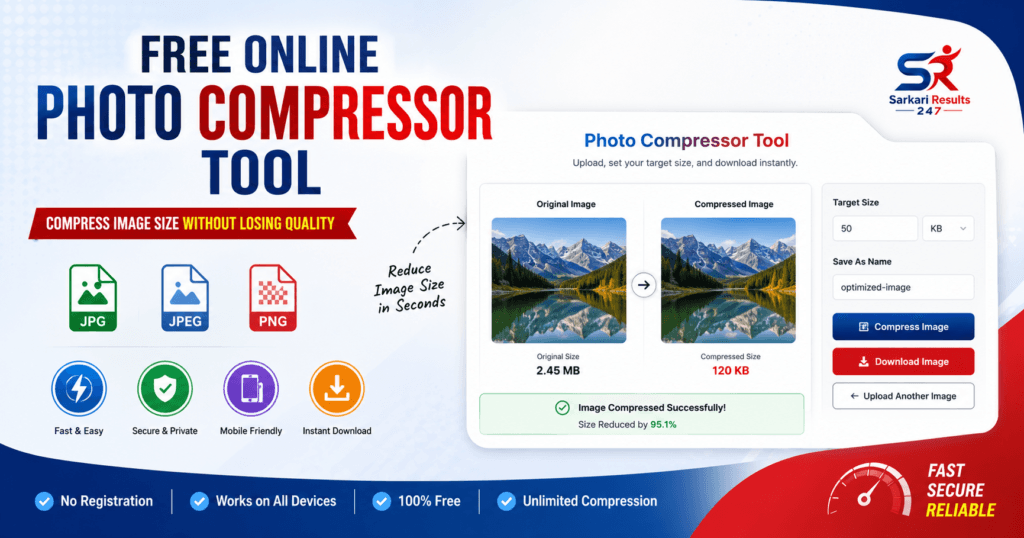
Are you struggling to upload photos because the file size is too large? Our highly advanced Photo Compressor Tool is the ultimate solution. Whether you need to compress an image to an exact target in KB or MB, optimize photos for a government application form, or shrink files for your website, our free tool handles it all effortlessly.
Why Should You Compress Your Images?
There are multiple scenarios where using a Photo Compressor Tool becomes a necessity. Let us explore the most common reasons why size optimization is critical:
- Online Government Forms & Applications: Most job portals and university websites have extremely strict file size rules. They often demand a passport photo to be exactly under 50KB or a signature under 20KB. Our tool handles these precise conversions effortlessly.
- Website Speed and SEO: Uploading heavy 5MB images will drastically slow down your website’s loading speed. According to Google’s Image Optimization Guidelines, compressing images to under 100KB improves your site’s SEO and delivers a lightning-fast experience to mobile users.
- Social Media & Sharing: Sending uncompressed photos via email or WhatsApp consumes mobile data. Compressing your pictures ensures fast sharing and saves your device’s storage space.
Best Features of Our Photo Compressor Tool
We provide a comprehensive set of features, bringing premium functionalities directly to your browser for free:
Core Compression Features
- Compress strictly by exact KB
- Compress strictly by exact MB
- Custom target size selection
- Maintain HD image quality
- Smart auto-compression logic
- One-click fast compression
- Live Before vs After preview
Compression Modes & Formats
- Low, Medium, and High Compression modes
- Preset Sizes: 20KB, 50KB, 100KB, 200KB
- Fully supports JPG, JPEG, PNG, WEBP
- Convert image formats while compressing
- Transparent PNG background support
Preview, Export & UX Features
- Original vs Compressed image preview
- Live File size comparison & Savings (%)
- Drag & Drop interface & Mobile responsive
- Download compressed image directly
- Rename file before final download
- Fast UI with clean modern design
- Bulk image compression capabilities
Social Media & Form Specific Features
- Compress for WhatsApp sharing
- Compress for Instagram quality
- Compress exactly for Passport Photos
- Compress for Government Exam Forms
- Compress perfectly for Website Uploads
How to Use This Photo Compressor Tool
Our tool has been meticulously engineered to be incredibly user-friendly. Follow these easy step-by-step instructions to optimize your digital photos:
- Step 1 (Upload): Navigate to the tool interface at the top of this page. Click the dashed Drag & Drop box to upload your target image from your device.
- Step 2 (Select Preset): In the control panel, choose your preferred target size. You can select a Preset (like 20KB for Passport, 50KB for Govt Forms) or select “Custom Target Size” to enter your own KB or MB value.
- Step 3 (Format Selection): If you want to change the format (e.g., convert PNG to JPG), select it from the Export Format dropdown.
- Step 4 (Compress): Click the blue “Compress Image” button. Our smart algorithm will instantly process the file.
- Step 5 (Download): Review the “Compression Saved Percentage” in the live preview box, and click the green “Download Compressed Image” button to save it.
Frequently Asked Questions (FAQs)
Is this Photo Compressor Tool completely free to use?
Yes, our comprehensive compression utility is 100% free. There are no hidden subscription fees, no daily limits, and absolutely no watermarks placed on your final downloaded images.
How do I compress an image exactly to 50KB?
It is very simple. Upload your image, go to the “Compression Settings” dropdown, and either select the “50 KB (Govt Forms)” preset or choose “Custom Target Size” and type 50. The tool will automatically adjust the quality and resolution to hit that target.
Will I lose visual quality during compression?
Our tool uses a smart balancing algorithm. It first attempts to reduce the file size by removing invisible data and slightly lowering the quality (which is invisible to the human eye). The final image will retain HD clarity.
How does the convert feature work?
You can compress and convert your photo at the same time. If you upload a heavy 2MB PNG and want it as a lightweight JPG, simply select “Convert to JPG” before clicking the compress button. The tool will handle the conversion and compression simultaneously
Are my uploaded photos safe?
Your privacy is our utmost priority. Because our tool relies on client-side processing, the entire compression operation happens directly on your device. No files are ever uploaded, saved, or monitored on any external servers.
We hope this Photo Compressor Tool helps you manage your digital files more effectively. Whether you are applying for a job on Sarkari Results 247 or optimizing your next big blog post, fast and reliable image compression is just a click away!