1 Best PDF converter Tool: Convert JPG, PNG to PDF Free
Explore More Free Tools
Best Image to PDF Converter Online
This advanced Image to PDF tool helps users convert JPG, PNG, WEBP, and scanned images into secure PDF files. The responsive Image to PDF workflow is optimized for students, office work, and government document uploads.
Are you struggling to upload photos because a website, job portal, or university application demands a single PDF document? In today’s highly digitized world, managing multiple image files like JPGs, PNGs, or WEBPs can be frustrating and disorganized. Whenever you need to submit identity proofs, scan multiple pages of a college assignment, or compile a professional portfolio, uploading dozens of separate images is rarely accepted. Our highly advanced, browser-based PDF converter Tool is the ultimate solution to this modern-day problem.
Whether you need to convert an image into standard A4 formatting, combine sequential pages for an important university assignment submission, or package confidential application files for government job portals, our free tool handles it all effortlessly. Best of all, it requires absolutely no software installation, no mobile app downloads, and no sign-ups. You get unlimited access to a premium-grade document compiler that works right from your web browser, ensuring your files are packaged perfectly within seconds.
How to Convert PDF converter Online Quickly
Using our web-based utility is incredibly straightforward, fast, and completely secure. Even if you are not tech-savvy, you will find the user interface highly intuitive. Follow these detailed, simple steps to compile your unorganized photos into a single, valid, and structured PDF document:
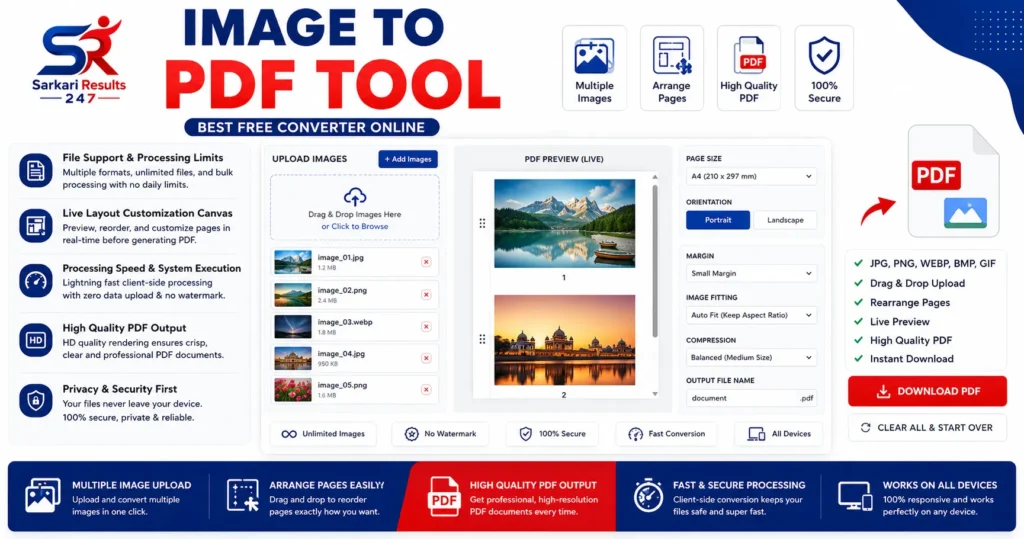
- Step 1: Upload Your Files: Click the upload drop-zone or simply drag and drop your target images directly into the designated area. Our powerful engine accepts bulk uploads instantly. You can select multiple JPG, PNG, WEBP, BMP, or GIF files at once from your computer or mobile gallery.
- Step 2: Sort and Arrange Pages: Once uploaded, you can manage your layout parameters via the dynamic list panel. Simply click, hold, and drag the image thumbnails to reorder them exactly how you want them to appear in the final PDF. If you accidentally uploaded a wrong image, just click the remove button to delete it from the queue.
- Step 3: Customize Page Layout: Watch the real-time layout canvas adjust dynamically as you alternate between sizes. You can choose standard document sizes like A4 or US Letter, or use the “Auto-Fit” option. Additionally, you can switch between portrait and landscape orientation, and add margin spaces (borders) around your images for a professional look.
- Step 4: Generate the Document: Once you are satisfied with the real-time preview, select your desired PDF quality (HD, Balanced, or Small Size) and enter a custom file name. Click the primary “Create PDF Document” button to build the document. The preview container will transition immediately into an interactive PDF viewer.
- Step 5: Review and Download: Review the structural accuracy and page alignment within the generated preview frame. If everything looks perfect, click the “Download PDF File” button to save the finalized file directly to your system’s local storage.
Advanced Features of Our Free PDF converter Tool
We pride ourselves on offering comprehensive, premium capabilities directly within your web browser without requiring slow third-party servers. Here is a deep dive into the powerful features that make our tool stand out from the rest:
File Support & Processing Limits
Unlike other tools that restrict how many images you can upload or charge you for premium formats, our tool is built for heavy-duty usage. It seamlessly reads and processes multiple web image standards without any hidden paywalls.
- Multiple Image Upload support in a single click
- Full compatibility with JPG, PNG, WEBP, BMP, and GIF
- Fluid Drag & Drop operational layout for desktop users
- Unlimited file capacity processing with no daily caps
- Bulk sequential optimization for large scanned documents
- Transparent PNG background auto-fill (renders as crisp white)
Live Layout Customization Canvas
Don’t guess what your final document will look like. Our tool features a state-of-the-art live preview engine that shows you exactly how your images will be placed on the PDF pages before you even click the generate button.
- Live real-time layout rendering canvas for instant feedback
- Drag parameters to reorder target rows and pages effortlessly
- A4, US Letter, and intelligent Auto-Fit dimension sizes
- Portrait and Landscape variable controls for optimal viewing
- Dynamic margin spacing allocations (Full bleed, Small, or Large borders)
- Advanced image fitting (Contain, Cover, or Stretch to fit)
Processing Speed & System Execution
Your time is valuable. Our application utilizes modern client-side scripting to harness the power of your own device, ensuring lightning-fast conversion rates without waiting in server queues.
- Integrated direct interactive PDF previewer post-generation
- HD PDF document structure creation for crisp text and images
- 100% Client-side browser computational layer (Zero uploads)
- No external server tracking mechanics or data harvesting
- Clean rendering profile completely free of annoying watermarks
- Adjustable compression levels to manage final file size
Why You Should Convert JPG, PNG, and WEBP to PDF
Formal application architectures, corporate compliance systems, and educational portals prioritize a unified file layout to accelerate processing times and ensure data integrity. When you submit five separate JPG files, there is a high risk of the files getting downloaded out of order, lost, or corrupted. Our dashboard solves this by mapping raw image pixels into sequential vector layouts according to recognized global document specifications.
By converting individual raster assets (like photographs or scanned papers) into organized PDF documents, structural displacement is avoided completely across diverse viewer platforms. Whether the receiver opens your document on a Windows PC, a Macbook, an iPhone, or an Android tablet, a PDF guarantees that the margins, orientations, and image qualities verified inside your live workspace display identically on their end. This universal compatibility is the primary reason PDFs are the gold standard for digital document sharing.
Best PDF converter Converter for Students and Professionals
An advanced online PDF converter solution helps students, office workers, freelancers, and business users organize digital documents professionally. Instead of uploading scattered JPG or PNG files, a reliable online PDF converter converter combines everything into one structured document. Modern universities, recruitment portals, and companies prefer PDF submissions because the PDF format preserves alignment and readability.
Students use an online PDF converter tool for assignment uploads, handwritten notes, scanned projects, and online exam documentation. Office users depend on online PDF converter systems for invoice sharing, business reports, scanned agreements, and HR paperwork. A secure online PDF converter workflow saves time and improves organization.
This browser-based online PDF converter converter works instantly without software installation. Users can upload multiple files, arrange pages, select layouts, and generate professional PDF documents within seconds. The responsive online PDF converter interface works smoothly on desktop and mobile devices.
Why People Prefer PDF converter Conversion
The demand for online PDF converter conversion is growing rapidly because PDF files are universally accepted across educational, professional, and government platforms. Individual image files can become disorganized during uploads, while an online PDF converter document keeps everything arranged sequentially.
Using an online PDF converter converter also improves compatibility. Whether someone opens the file on Windows, Android, iPhone, Mac, or Linux, the document structure remains consistent. That is why online PDF converter technology is considered essential for modern digital communication.
A high-quality online PDF converter tool preserves image sharpness, page orientation, and spacing. This is especially important for certificates, signatures, scanned identity proofs, and official forms. Reliable online PDF converter processing prevents layout distortion and maintains document clarity.
Convert JPG and PNG with PDF converter Technology
Modern users frequently need fast online PDF converter conversion for JPG, PNG, WEBP, BMP, and GIF files. This intelligent online PDF converter system supports multiple image formats without reducing quality. The converter allows users to merge images into one organized PDF instantly.
When converting documents through an online PDF converter platform, users can customize margins, orientation, layout fit, and output quality. These controls make the online PDF converter process ideal for school projects, office records, scanned books, and professional presentations.
The optimized online PDF converter engine generates clean PDF files that are easy to share through email, cloud storage, and online forms. Because the online PDF converter workflow runs directly in the browser, users get fast performance with enhanced privacy protection.
Secure Browser Based PDF converter Processing
Privacy is extremely important when converting sensitive files. Many websites upload user documents to remote servers during conversion. This secure online PDF converter tool works differently because it processes everything locally inside your browser.
The browser-based online PDF converter framework ensures that uploaded images remain on your device. No external server stores your personal files during the online PDF converter conversion process. This makes the platform suitable for confidential office documents, legal paperwork, educational certificates, and personal identity records.
Fast local rendering also improves overall online PDF converter speed. Since the files are not transferred to remote systems, the online PDF converter workflow becomes more responsive and efficient for both desktop and mobile users.
Benefits of Using an Online PDF converter Converter
- Fast online PDF converter conversion without software installation
- Unlimited online PDF converter document creation
- Professional online PDF converter layout rendering
- Mobile optimized online PDF converter interface
- Secure browser-based online PDF converter processing
- High quality online PDF converter generation
- Easy drag-and-drop online PDF converter workflow
- Free online PDF converter document management system
- Supports JPG, PNG, WEBP, BMP, and GIF for online PDF converter conversion
- No watermark added during online PDF converter export
Popular Uses of PDF converter Converter
online PDF converter conversion is widely used across schools, colleges, offices, and businesses. Students use online PDF converter tools for homework uploads, project reports, scanned notes, and admission forms. Office workers rely on online PDF converter systems for invoices, contracts, reports, and employee documents.
Government recruitment portals often require PDF uploads, making online PDF converter conversion extremely important for applicants. Users frequently convert passport images, signatures, Aadhaar cards, PAN cards, and certificates through an online PDF converter workflow.
Freelancers and designers also use online PDF converter technology to build portfolios and professional presentations. Because PDF files are organized and easy to share, online PDF converter processing has become a standard requirement in digital workflows.
Free JPG to PDF and PNG to PDF Converter
This advanced online PDF converter platform supports both JPG to PDF and PNG to PDF conversion with high accuracy. Users can convert scanned photos, handwritten notes, screenshots, and official records into structured PDF files instantly.
The responsive online PDF converter layout engine ensures proper spacing, alignment, and orientation during document generation. Whether you need a lightweight PDF for quick sharing or a high-definition online PDF converter output for printing, the converter provides flexible quality controls.
Unlike many restricted services, this free online PDF converter converter does not add watermarks or impose daily usage limits. Users can perform unlimited PDF converter operations directly through their browser.
Advanced PDF converter Workflow for Better Productivity
A professional PDF converter workflow improves productivity by reducing manual file handling. Instead of attaching multiple image files separately, users can create one organized PDF document through a single PDF converter process.
The live preview system inside this PDF converter converter allows users to see layout adjustments before final generation. This helps prevent formatting errors and ensures the final PDF converter document appears clean and professional.
Because the PDF converter system supports drag-and-drop sorting, users can rearrange pages easily. This feature is extremely useful for scanned assignments, office reports, business records, and project documentation.
Conclusion : Best Image to PDF Tool Online
If you need a fast, secure, and professional document conversion platform, this Image to PDF tool is an ideal solution. The modern Image to PDF interface supports multiple formats, advanced customization, live preview rendering, and high-quality PDF export.
Whether you are a student, office worker, freelancer, or business professional, this free Image to PDF converter simplifies digital document management. With secure browser-based rendering and unlimited conversion support, the Image to PDF workflow delivers reliable results for every user.
Image to PDF conversion helps users organize digital files professionally. A reliable Image to PDF converter improves workflow management for students, office workers, and businesses. Modern online portals require structured PDF uploads, making Image to PDF technology extremely important.
This advanced Image to PDF system supports secure browser processing, fast rendering, and HD quality export. Users can depend on this Image to PDF platform for assignments, invoices, certificates, reports, and scanned paperwork. The responsive Image to PDF interface works efficiently across desktop and mobile devices.
Because PDF files are universally accepted, Image to PDF conversion simplifies sharing and improves document organization. A professional Image to PDF workflow ensures proper page structure, alignment, and readability for every device.
Whether you need JPG to PDF conversion, PNG to PDF conversion, or complete document compilation, this Image to PDF tool provides a fast and secure solution. Unlimited Image to PDF processing makes the converter suitable for daily personal and professional use.
The intelligent Image to PDF engine preserves image clarity while generating optimized PDF files. High-speed Image to PDF rendering reduces waiting time and improves productivity for students and professionals.
Users searching for a free Image to PDF converter often need privacy protection, mobile support, and watermark-free export. This browser-based Image to PDF system delivers all essential features in one platform.
With modern customization controls, the Image to PDF workflow allows users to select margins, page orientation, and quality settings easily. Flexible Image to PDF processing helps create professional documents for educational, corporate, and government requirements.
Image to PDF tools are essential for modern document sharing. A professional Image to PDF converter improves file organization and upload compatibility. This Image to PDF platform supports secure processing and fast PDF generation. Users prefer this Image to PDF workflow because it is mobile friendly and easy to use.
Students and professionals trust this Image to PDF system for assignments, reports, and scanned records. The optimized Image to PDF engine preserves quality while creating structured PDF documents. Fast Image to PDF rendering improves productivity and document management.
This browser-based Image to PDF converter supports unlimited usage. Reliable Image to PDF processing ensures better compatibility for educational and business workflows. A secure Image to PDF solution helps users create professional PDF files instantly.
Image to PDF conversion delivers fast document management. This Image to PDF converter supports secure uploads, high quality export, and responsive performance. Modern Image to PDF processing improves compatibility for online forms and professional workflows. Reliable Image to PDF technology simplifies digital document sharing. Advanced Image to PDF rendering maintains layout consistency for every device.
Frequently Asked Questions (FAQs)
If you still have questions about how our tool operates or what it can handle, check out these detailed answers to the most common queries we receive from our users:
Is this Image to PDF Tool completely free?
Yes, the converter provides full, unrestricted capabilities without subscription limits, hidden fees, or watermark additions. You can compile unlimited batches of documents, reorder them, and download them completely free of charge, as many times as you need.
Can I convert standard JPG photos to PDF online?
Absolutely. The workspace naturally structures standard compression streams like JPG and JPEG. By adjusting layout aspect layers, our engine easily reads your JPG photos and compiles them into a clear, structured, and universally accepted PDF document instantly.
Does this tool support high-quality PNG images?
Yes, the framework reads PNG image maps accurately, including those with complex alpha-channels (transparency). It ensures sharp visual definition with optimized, clean white background fallbacks during compilation so your transparent logos or signatures look perfect on the PDF page.
Can I use this converter tool on my mobile phone?
Yes, the entire system employs highly responsive viewport rules. It adapts the control panels and the layout preview dynamically to optimize single-hand drag-and-drop operations on touch screens. It works flawlessly on iPhones, iPads, and all Android devices directly through your mobile browser like Chrome or Safari.
Is my image upload secure and private?
Completely. The framework uses localized JavaScript loops, processing every compilation variable directly inside your browser’s sandbox. We do not have access to your files, and we do not deploy file links to secondary networks or cloud storage. Your data remains strictly on your device.